Tank Tool
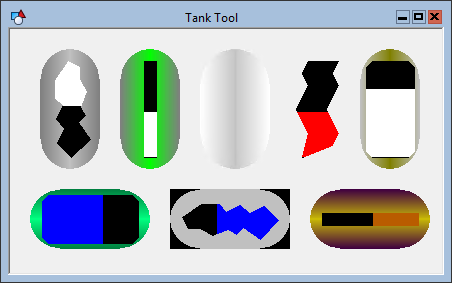
 The Tank Tool creates a tank image for which the fill level corresponds to a given range. The range is defined by the PositionMin and PositionMax properties of the object. The fill level is set by the Position property. In Edit mode, you can assign a default value to this property. If the object is associated with a point, the default Position value is replaced in Run mode by the actual value of the point.
To associate the object with a point use the point identifier properties to form a fully qualified CygNet tag string. The point identifier properties are [1:SiteService], [2:Point ID], [3:Long Point ID], [4:Facility ID], and [5:UDC]. If the object is on a templated screen, only use the [5:UDC] property.
The orientation of the tank can be either vertical or horizontal. If you change the orientation, you will also have to adjust the object’s boundary to match.
The PointerStyle property specifies the cutout type. The PointerColor property specifies the tank fill color.
The tank exterior colors are specified by the Tank Color and Tank Shadow Color properties. Tank Color is the basic color of the tank. Tank Shadow Color is the exterior highlight or gradient.
You can make the entire exterior of the tank disappear by setting the TankShow property to 0 - No. The PointerStyle (cutout) will still be visible.
The [AlarmElement] property can be set to show the point state color in the object’s Background Color, the Pointer Color, the Tank Color, the Tank Shadow Color, or not at all (None). When set to None, the color specified for each component is shown. If set to one of the other options, the component color is replaced with the point state color.
The [UseCustomStateColors] property enables the object to use its own custom point state colors. If set to 1 - Yes, the colors used are those defined by the object’s [CustomStateColors] property. If set to 0 - No, the colors are those defined by the TheView’s [CustomStateColors] property.
More:
 Tank Tool - Properties, Events, and Methods
Tank Tool - ActiveX Properties
Tank Tool - Dynamic Configuration of ActiveX Properties

